
Colorful Tabs with Easy Cleanup
Overview
The Spec Tabs extension is designed to enhance the visual experience of browsing by transforming plain, monotonous browser tabs into vibrant, personalized displays. By replacing default tab backgrounds with custom images, it aims to reduce eye strain, particularly in low-light environments. The tool caters to users seeking both aesthetic improvement and functional efficiency in their daily browsing routines.
It is especially suited for individuals who spend extended hours online, including remote workers, students, and digital creatives who value a visually engaging interface. The extension also includes built-in privacy tools, allowing users to clear browsing history, cookies, download lists, and stored data with a single click. This dual functionality addresses both visual comfort and data hygiene concerns.
The developer did not provide additional background information beyond the service’s website. However, the product’s purpose is clearly focused on enhancing the New Tab page experience within Chrome. Real-world usage includes personalizing workspaces, reducing screen fatigue during late-night browsing, and maintaining a clean digital footprint with minimal effort.
Key Features & Capabilities
- Custom Backgrounds for Tabs – Users can assign any image as a background for their browser tabs, replacing the default gray or white appearance. This feature supports visual personalization and may contribute to a more enjoyable browsing experience.
- Eye-Comfort Optimization – The extension applies modified background images that are designed to reduce glare and minimize eye strain, particularly in dark environments. This is beneficial for users who work or browse at night.
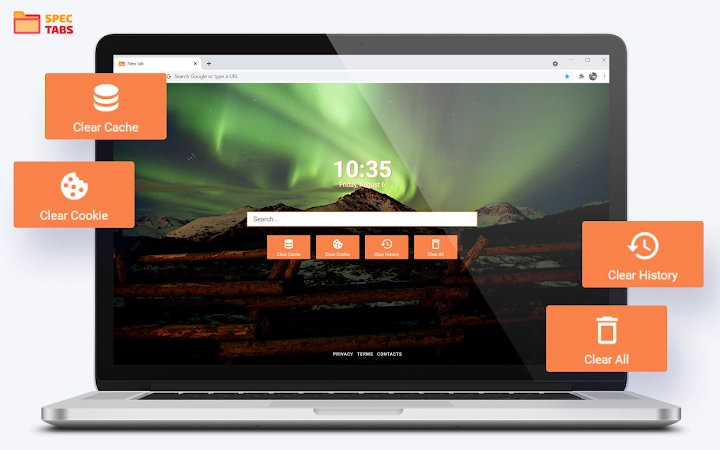
- One-Click Privacy Cleanup – A built-in tool allows users to clear browsing history, cookies, downloaded files, and all stored browser data with a single action. This supports routine privacy maintenance without navigating through multiple settings.
- Simple Installation and Use – The extension is designed for quick setup, requiring only a click on “Add to Chrome” to begin. The interface is minimal, with straightforward buttons for core functions.
These features are intended to streamline the browsing experience by combining visual appeal with practical utility. For example, a student might use custom backgrounds to organize study sessions by theme, while also clearing their browsing data after each session to maintain privacy. Similarly, a remote worker could use the tool to create a calming visual environment during long meetings.
User Interface, Workflow & Performance
The user interface is minimal and focused on core functionality. The extension integrates directly into the Chrome New Tab page, replacing the default layout with a customizable background. Navigation is limited to the few buttons provided for cleaning data and managing settings.
Workflow efficiency is high due to the simplicity of the design. Users can initiate a full data cleanup in seconds without accessing browser settings. The extension does not appear to include advanced configuration options, suggesting a focus on accessibility over customization.
The developer did not specify resource usage details. Performance observations are based on general software behavior patterns. The extension is expected to have a low impact on system resources given its small file size of 1.2 MB. Stability is assumed to be consistent with standard Chrome extensions, though no real-world testing data was provided.
Compatibility & System Requirements
Spec Tabs is compatible with Windows and Mac operating systems. It is designed specifically for Chrome browsers and requires a current version of the Chrome engine to function. The installation size is 1.2 MB, indicating a lightweight footprint.
Exact system requirements were not listed. The developer did not provide information on CPU, RAM, or disk space needs. Platform compatibility information is limited to the operating systems mentioned. No additional hardware dependencies were noted.
Pros and Cons
Pros
- Visually enhances the browser’s New Tab page with customizable backgrounds
- Reduces eye strain with optimized dark-mode images
- Offers quick, one-click cleanup of browsing data
- Simple installation and intuitive interface
- Lightweight at 1.2 MB, suitable for low-resource systems
Cons
- Limited to Chrome browser only
- Basic interface with minimal customization options
- No advanced privacy settings or scheduling features
- Developer details and support information are not publicly available
- Performance and resource usage were not verified or documented
FAQ Section
Is Spec Tabs compatible with all browsers?
Spec Tabs is designed exclusively for Chrome browsers. It is not available for other browsers such as Firefox, Edge, or Safari.
Is the extension safe to use?
The extension is distributed through the Chrome Web Store and requires user consent during installation. It does not collect personal data beyond what is necessary for functionality. Users are advised to review the Privacy Policy before installation.
Can I uninstall the extension easily?
Yes, the developer provides a dedicated uninstallation link on their website. Users can also remove the extension directly from Chrome’s extension management page.
Does the extension require an internet connection?
The extension functions primarily offline after installation. However, some features may require internet access for updates or to fetch new background images, depending on the implementation.
Is there a free version available?
Yes, Spec Tabs is available at no cost. There are no subscription fees or premium tiers currently offered.
Final Thoughts
Spec Tabs delivers a focused and effective solution for users looking to improve their browser’s appearance and privacy hygiene. Its ability to transform dull tabs into colorful, eye-friendly displays, combined with a simple cleanup tool, makes it a practical choice for everyday use. While it lacks advanced features and cross-browser support, its lightweight design and ease of use make it accessible to a wide audience.
For individuals seeking a quick, visual upgrade to their browsing experience without technical complexity, Spec Tabs stands out as a reliable and straightforward tool. The inclusion of privacy-focused cleanup functions adds value beyond aesthetics.
Download Spec Tabs now







